
Fire TV
Set Up
Fire TV serves tens of millions of customers, the companion app is also used by millions of customers. With this many users, even small points of friction in set up can impact a massive number of customers.
Context
First impressions matter...on a date, in a job interview, and even more when someone turns on a device for the first time.
73% of Fire TV customers say their purchase decisions are influenced by their initial product experiences, with ease of set up being a major factor. This is the point at which they decide whether the product feels intuitive, trustworthy, and worth the investment after unboxing.
Historically, Fire TV setup occurred entirely on the primary device using a remote control. While this approach supported basic activation tasks, it created significant friction for activities requiring text input or multiple decisions, such as Wi-Fi configuration, account authentication, permissions, and personalization. It was also a very dated way to set up a device. Internal research showed that customer behavior has shifted toward multi-device interaction patterns. Television viewing rarely occurs in isolation, customers frequently interact with a phone or tablet while watching TV. Over 70% of time mapped from customers was spent on input heavy steps like account authentication or address input. This signaled to me that there has been a mismatch between the complexity of the task and the device input used to complete it.
Device onboarding should be viewed, not as a linear flow, but as a coordinated experience across devices. The goal of the project was to design a mobile-first setup architecture that distributes tasks across the television and a companion device, allowing customers to complete complex interactions using the device best suited for them. This initiative represents a strategic transformation of Fire TV’s out-of-box experience, shifting setup from a transactional process to a coordinated cross-device system that minimizes cognitive load while accelerating access to content (which was another workstream running in parallel).
73% of Fire TV customers say their purchase decisions are influenced by their initial product experiences, with ease of set up being a major factor. This is the point at which they decide whether the product feels intuitive, trustworthy, and worth the investment after unboxing.
Historically, Fire TV setup occurred entirely on the primary device using a remote control. While this approach supported basic activation tasks, it created significant friction for activities requiring text input or multiple decisions, such as Wi-Fi configuration, account authentication, permissions, and personalization. It was also a very dated way to set up a device. Internal research showed that customer behavior has shifted toward multi-device interaction patterns. Television viewing rarely occurs in isolation, customers frequently interact with a phone or tablet while watching TV. Over 70% of time mapped from customers was spent on input heavy steps like account authentication or address input. This signaled to me that there has been a mismatch between the complexity of the task and the device input used to complete it.
Device onboarding should be viewed, not as a linear flow, but as a coordinated experience across devices. The goal of the project was to design a mobile-first setup architecture that distributes tasks across the television and a companion device, allowing customers to complete complex interactions using the device best suited for them. This initiative represents a strategic transformation of Fire TV’s out-of-box experience, shifting setup from a transactional process to a coordinated cross-device system that minimizes cognitive load while accelerating access to content (which was another workstream running in parallel).
Research
Product requirements led the initial project scope down a path of porting over the existing flow into a new design system, leaving out adjustments to the flow itself and steps. After having a sense of awareness about this CX from studies on the overall exprience architecture, I conducted a synthesis of internal usability studies, competitor audits, and behavioral research related to device onboarding.
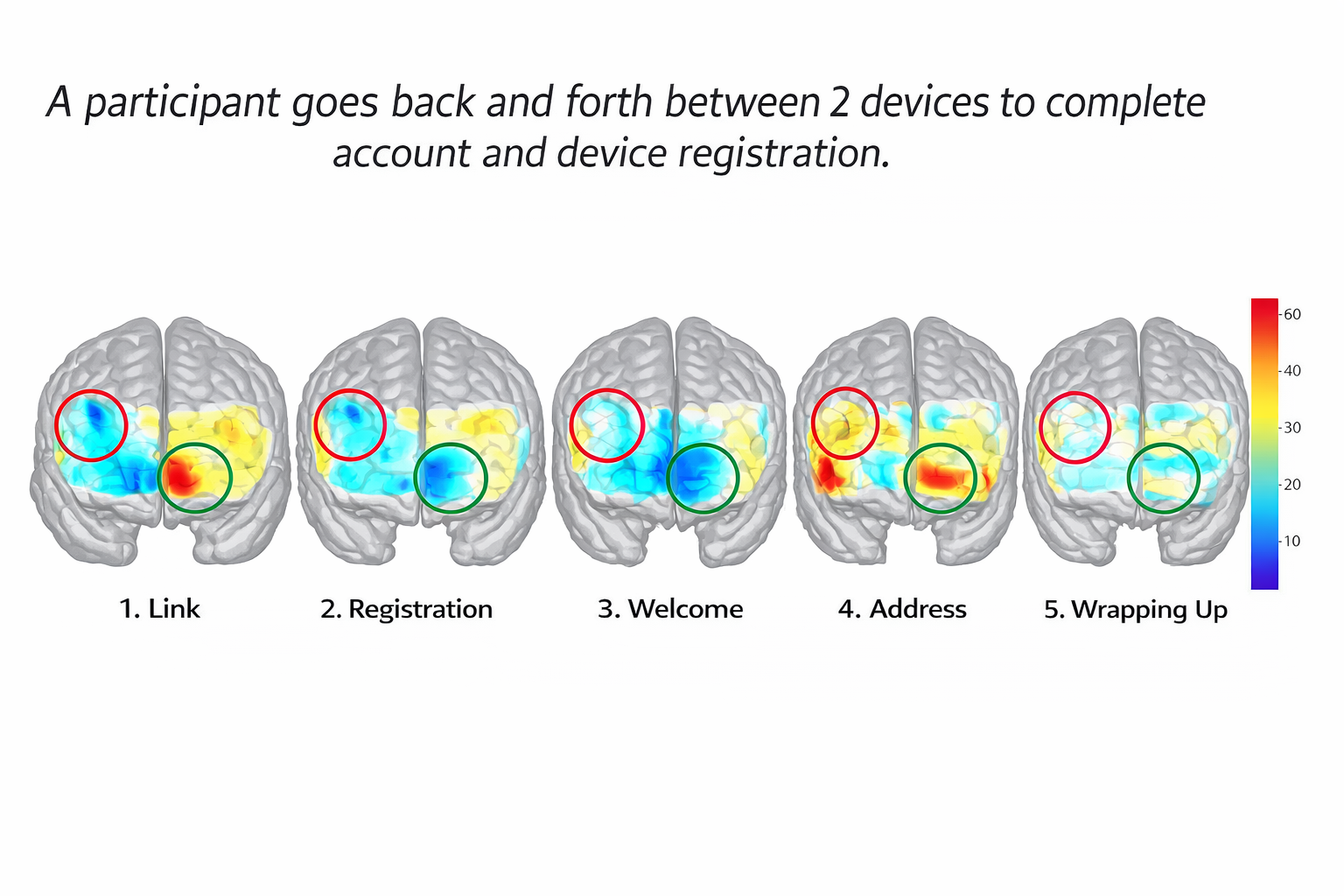
Internal research revealed that the most time consuming and cognitively demanding parts of set up were tasks requiring text entry or repeated authentication across devices. In prior studies of multimodal device onboarding, configuration and account registration steps accounted for the majority of total set up time and required the highest mental effort from participants. Customers were being forced to enter large amounts of input... on their d-pad remote.
Additional research also surfaced behavioral patterns around setup expectations. Customers consistently described device set up as slow, confusing, and overly procedural. Many customers reported uncertainty about whether setup was complete and what information had been collected during the process. We had thousands of customer service calls regarding set up. This indicated that beyond simplifying interactions, the system needed to communicate progress and build trust during onboarding. I learned steps like connecting to Wi-Fi, entering a device name, or adding an address take some time, but not nearly as much as account authentication. The earlier steps like landing on the screen, choosing a language, or accessibility are quick and pretty consistent for everyone.
Internal research revealed that the most time consuming and cognitively demanding parts of set up were tasks requiring text entry or repeated authentication across devices. In prior studies of multimodal device onboarding, configuration and account registration steps accounted for the majority of total set up time and required the highest mental effort from participants. Customers were being forced to enter large amounts of input... on their d-pad remote.
Additional research also surfaced behavioral patterns around setup expectations. Customers consistently described device set up as slow, confusing, and overly procedural. Many customers reported uncertainty about whether setup was complete and what information had been collected during the process. We had thousands of customer service calls regarding set up. This indicated that beyond simplifying interactions, the system needed to communicate progress and build trust during onboarding. I learned steps like connecting to Wi-Fi, entering a device name, or adding an address take some time, but not nearly as much as account authentication. The earlier steps like landing on the screen, choosing a language, or accessibility are quick and pretty consistent for everyone.

Discovery
To better understand how Fire TV’s experience compared to competitors, I conducted an audit of onboarding flows across Google TV, Roku, Apple TV, and Amazon’s own multimodal devices. The analysis showed that Google provided the most structured second-screen onboarding with strong progress feedback and continuity between devices, while Apple excelled at ecosystem level automation through account and device synchronization. Roku offered the broadest accessibility through browser-based setup but lacked personalization and felt more transactional than experiential. These findings highlighted an opportunity for Fire TV to combine the strengths of these approaches while creating a more integrated dual-screen experience. I additionally led a workshop with product and engineering partners in Berlin to learn more about business requirements, feasibility, tech advancements, and more.


Reframing the Problem
Early exploration showed me that the challenge was not simply redesigning setup screens. The existing experience treated onboarding as a linear sequence of steps on a single device, even though the tasks themselves varied widely in complexity and interaction requirements.The findings from this work show that the Fire TV setup experience feels long and frustrating not because every step is slow, but because a few high-effort tasks dominate the process. Activities like account registration, password entry, and address input take up most of the time and require significant effort when completed using a remote.
This highlights a fundamental mismatch between the task and the device, as the television is not well suited for input-heavy interactions. At the same time, the experience places a high cognitive load on users by presenting many decisions early in the process without clearly distinguishing what is required versus optional. This makes setup feel overwhelming and contributes to the research that shows customers believe set up “never ends,” even when many steps are relatively quick.
The reality is that set up isn’t a linear process, it behaves as a conditional system. Some steps depend on others, some can be skipped, and others can be deferred until after setup is complete. Treating this as a fixed, step-by-step flow creates unnecessary friction and makes progress difficult to communicate clearly. This is further complicated by a lack of transparency, as users are often unsure why certain information is being requested or how close they are to finishing. Traditional progress indicators become misleading in this context, since the number of steps changes depending on user choices.
Additionally, the findings showed that users already engage in second-screen behavior, often using their phones while interacting with the TV. This suggests that introducing a companion device during setup would not require new behavior, but rather build on something that is already natural. Different customers approach setup with very different needs. Some want to move through it as quickly as possible, while others prefer more control and customization. A single rigid flow cannot effectively support everyone. Together, these insights point to the need for a more flexible, cross-device system that reduces input friction, lowers cognitive load, and adapts to different user paths rather than forcing all users through the same experience.
This highlights a fundamental mismatch between the task and the device, as the television is not well suited for input-heavy interactions. At the same time, the experience places a high cognitive load on users by presenting many decisions early in the process without clearly distinguishing what is required versus optional. This makes setup feel overwhelming and contributes to the research that shows customers believe set up “never ends,” even when many steps are relatively quick.
The reality is that set up isn’t a linear process, it behaves as a conditional system. Some steps depend on others, some can be skipped, and others can be deferred until after setup is complete. Treating this as a fixed, step-by-step flow creates unnecessary friction and makes progress difficult to communicate clearly. This is further complicated by a lack of transparency, as users are often unsure why certain information is being requested or how close they are to finishing. Traditional progress indicators become misleading in this context, since the number of steps changes depending on user choices.
Additionally, the findings showed that users already engage in second-screen behavior, often using their phones while interacting with the TV. This suggests that introducing a companion device during setup would not require new behavior, but rather build on something that is already natural. Different customers approach setup with very different needs. Some want to move through it as quickly as possible, while others prefer more control and customization. A single rigid flow cannot effectively support everyone. Together, these insights point to the need for a more flexible, cross-device system that reduces input friction, lowers cognitive load, and adapts to different user paths rather than forcing all users through the same experience.
Aligning Scope with Customer Needs
Business requirements led us to initially scoping this work to rebuild the entire out of box experience flow into mobile to offer the most complete set up on market. Had we gone through with this, we would have ported over the existing linear flow with all of the known customer pain points. This would have made the business happy, however, customers would have still been just as frustrated... just in a different viewport.
However, I readjusted to become the fastest to content and to leverage new technology. This would have essentially been a UI redesign had I not prioritized this as a larger level of effort.
However, I readjusted to become the fastest to content and to leverage new technology. This would have essentially been a UI redesign had I not prioritized this as a larger level of effort.

Adaptive Flow
An adaptive flow meets customers where they are by adjusting to their needs, context, and level of familiarity, rather than forcing everyone through the same rigid sequence of steps.
In a linear flow, all users regardless of experience, intent, or setup conditions must complete the same tasks in the same order, which can create unnecessary friction, especially for those who want to move quickly or skip steps they’ve already completed before. An adaptive flow, on the other hand, responds to user input, device state, and prior information, allowing experienced users to accelerate through setup while giving others the guidance they need. This approach reduces cognitive load, avoids redundant work, and makes the experience feel more intuitive and respectful of the user’s time, ultimately leading to faster and more confident completion that expands on product partner needs.
In a linear flow, all users regardless of experience, intent, or setup conditions must complete the same tasks in the same order, which can create unnecessary friction, especially for those who want to move quickly or skip steps they’ve already completed before. An adaptive flow, on the other hand, responds to user input, device state, and prior information, allowing experienced users to accelerate through setup while giving others the guidance they need. This approach reduces cognitive load, avoids redundant work, and makes the experience feel more intuitive and respectful of the user’s time, ultimately leading to faster and more confident completion that expands on product partner needs.

The Goal
Make Fire TV the fastest set up experience by prioritizing speed to content instead of a linear CX that completes every configuration step upfront.
Object Model
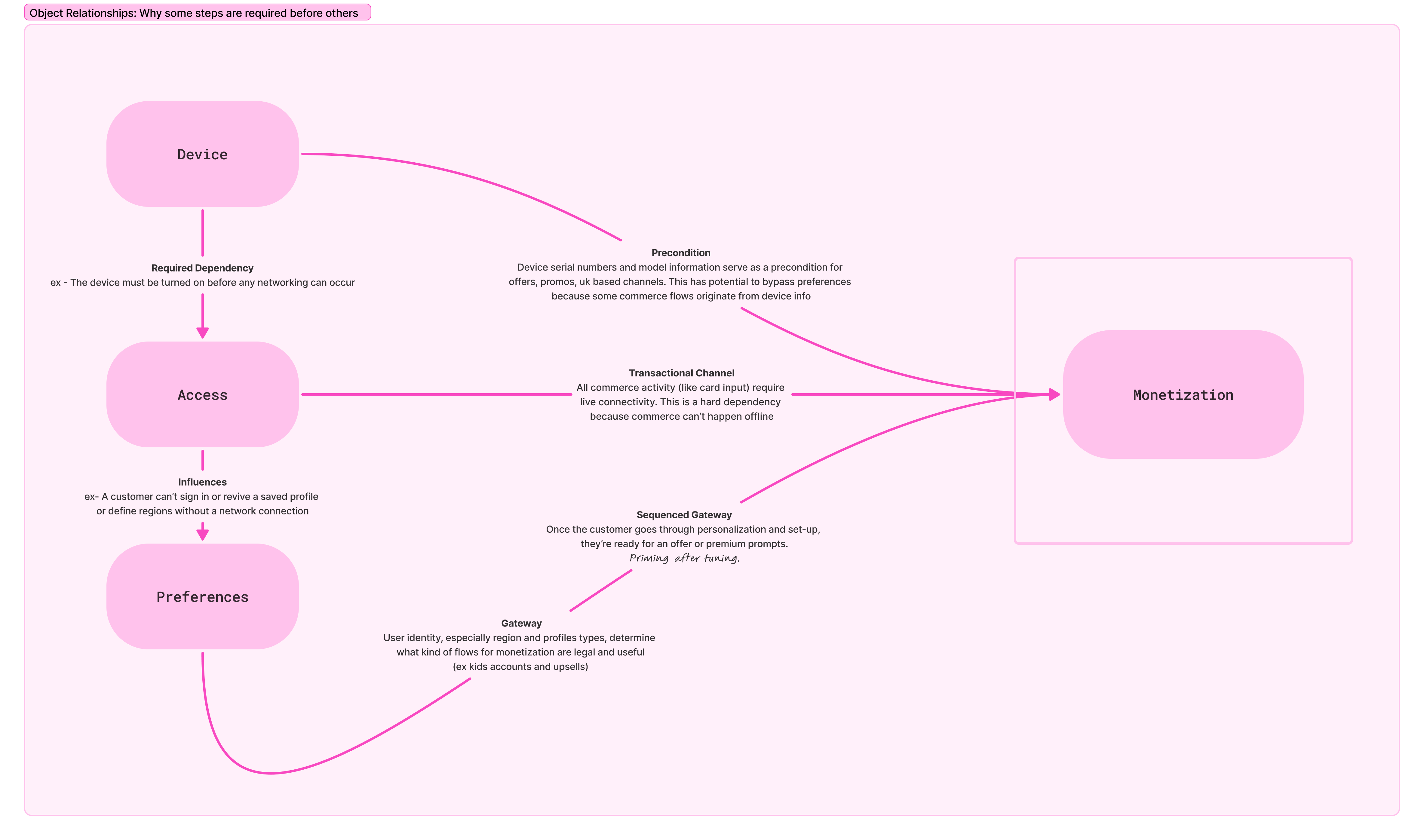
The system maps onboarding tasks across five primary objects: Device, Access, Preferences, Monetization, and Experience. Each object represents a group of related configuration actions that contribute to the customer’s final device state. This diagram shows how different parts of the setup system depend on each other and why certain steps have to happen before others. It starts with the device, which must be powered on before anything else can happen. From there, users move into access, where they connect to the internet. Once access is established, users can set their preferences, like profiles or regions, which further shape what content and features are available to them. All of these steps feed into monetization, but only after certain conditions are met.
Orchestrated Interaction Model
The new system treats the television as a reassuring surface that communicates high-level progress, while the companion device handles more detailed interactions and data entry.
Sensitive information such as account credentials, forms, and consent text remains on the personal device, reducing privacy concerns associated with displaying this information on a shared screen... an important use case because a preteen can eyeball your credit card details for their future Minecraft purchases.
This division of responsibility also allows the television interface to remain visually calm and focused. Instead of presenting long configuration flows, the TV displays short status updates such as “Connecting,” “Signing in,” or “Finalizing,” while the companion device manages the underlying tasks. This orchestration model ensures that both devices remain synchronized without overwhelming customers with duplicate information or conflicting instructions.
Sensitive information such as account credentials, forms, and consent text remains on the personal device, reducing privacy concerns associated with displaying this information on a shared screen... an important use case because a preteen can eyeball your credit card details for their future Minecraft purchases.
This division of responsibility also allows the television interface to remain visually calm and focused. Instead of presenting long configuration flows, the TV displays short status updates such as “Connecting,” “Signing in,” or “Finalizing,” while the companion device manages the underlying tasks. This orchestration model ensures that both devices remain synchronized without overwhelming customers with duplicate information or conflicting instructions.
The Flows
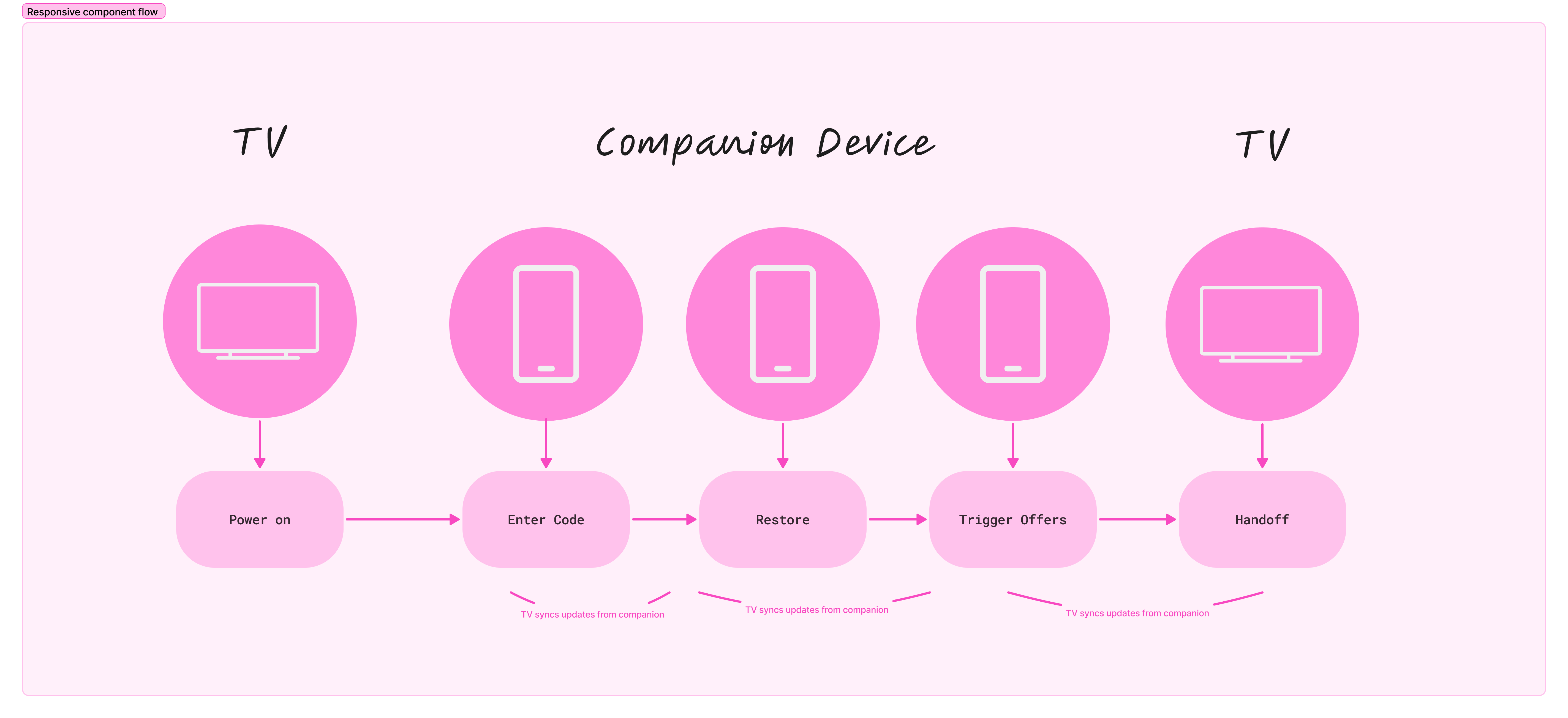
As I've mentioned, the second screen set up experience is not a linear sequence of steps. The flow contains multiple conditional paths based on device state, network availability, and customer choices. For example, customers with existing Fire TV devices can restore settings through frustration-free setup, skipping several configuration steps entirely. Other users may defer optional tasks such as payment entry or content subscriptions until after setup is complete. Because of this variability, traditional progress bars would create misleading expectations about the number of steps remaining and add additional noise to the UI. Instead, the design uses milestone-based feedback that communicates progress through high-level stages such as connecting, personalizing, and installing updates. This approach preserves flexibility within the system while maintaining clarity for customers.

Outcome
The resulting system establishes a mobile-first onboarding model that distributes setup tasks across devices while maintaining a cohesive customer experience. By allowing complex configuration steps to occur on a companion device, the system reduces friction associated with remote-based input and accelerates the path to content.
Beyond improving the setup flow itself, the architecture creates a foundation for faster iteration and experimentation. By decoupling key setup interactions from the television interface, the system allows teams to test new experiences and deploy improvements without waiting for full operating system updates.
The overall improvements that I would make in the workflow would be identifying the effort shift sooner in the process, aligning with visual designers on areas such as paragraph length and alignment, and asking for UX Writers to be scoped into the work with my program manager instead of relying on marketing copy.
The project ultimately reframes device setup as a coordinated interaction system rather than a static onboarding flow, enabling Fire TV to support more flexible and scalable customer journeys in the future.
Beyond improving the setup flow itself, the architecture creates a foundation for faster iteration and experimentation. By decoupling key setup interactions from the television interface, the system allows teams to test new experiences and deploy improvements without waiting for full operating system updates.
The overall improvements that I would make in the workflow would be identifying the effort shift sooner in the process, aligning with visual designers on areas such as paragraph length and alignment, and asking for UX Writers to be scoped into the work with my program manager instead of relying on marketing copy.
The project ultimately reframes device setup as a coordinated interaction system rather than a static onboarding flow, enabling Fire TV to support more flexible and scalable customer journeys in the future.
